Jupyter Notebook 技巧(1): 使用jupytext 同步編輯 .ipynb 與 .py 檔
是否曾遇到以下情況:使用 jupyter notebook 編輯 .ipynb 後,忘記到底改了哪些東西,想要用 git diff 查看,卻發現由於 .ipynb 為 json 格式,同時包含了許多 output 資料,比對下來都是 output 資料的改動,不知道到底 code 有沒有動到?
通常我們在做版本控管時,只想查看 code 的變動,不想知道 output 的變動。所以過去的做法是(參考附錄),我會在 jupyter notebook 存檔時,另外再輸出一份 .py 檔,如此不論 .ipynb 怎麼變,只要 .py 檔沒變,就表示 code 沒動到,改變的是 output。而commit 的時候同時上傳 .ipynb 及 .py 兩個檔案,這樣當追蹤版本時,只需要查看 .py 檔案的變化;當要給別人看輸出時,就可以給他們看 .ipynb 的 output。
後來我發現一個套件可以做到類似事情:
Jupytext 是一個可以同步對 jupyter notebook 檔案與純文字 .py 檔進行編輯的套件。它可以產生 notebook 配對的 .py 檔,同步兩邊的編輯;或是直接把.py檔當成 notebook 一樣編輯,而無須保留 .ipynb 檔。
 mwouts
安裝

首先執行
pip install jupytext執行以下指令安裝extension:
jupyter nbextension install --py jupytext [--user]
jupyter nbextension enable --py jupytext [--user]
安裝後重新啟動 jupyter notebook,應該會出現 jupyter menu:
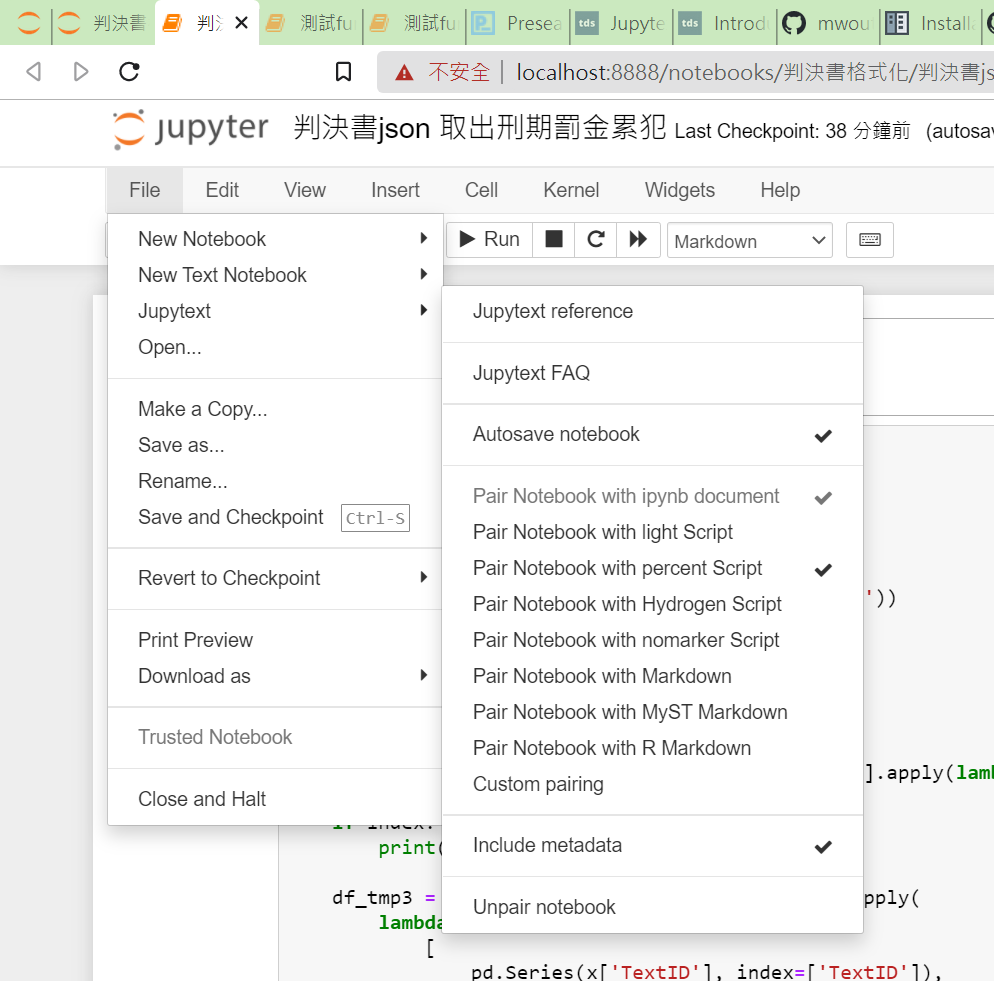
自動產生 notebook 配對的 .py 檔

在 $HOME/.config/jupytext 中建立一個檔案名為 .jupytext.toml 內容如下:
# Always pair ipynb notebooks to py:percent files
formats = "ipynb,py:percent"
存檔後,重新啟動 jupyter notebook
從此以後,用 jupyter notebook 開啟 .ipynb 編輯儲存,就會產生一份同名配對的 .py 檔,這份配對的 .py 檔可以在文字編輯器中直接編輯,存檔後也會同步到 .ipynb 中。
而 jupyter notebook 也可以直接開啟 .py 檔,jupytext 會自動將之轉成 notebook 形式,所以看起來就像在 .ipynb 中工作。唯一的差別是, .py 不儲存輸出的結果,而 .ipynb 會保留所有輸出結果。
當你需要保存輸出結果(例如:圖表、文字...等)給其他人看時,最好在 .ipynb 上編輯、存檔,這樣可保留輸出結果。同時,jupytext 產生配對的 .py 檔,可以方便做版本控制。在 git commit 中保留 .ipynb 與 .py 兩個檔案,這樣當 .ipynb 上有甚麼修改,會立刻同步到 .py 檔,這時用 git diff 查看,就能立即看出修改處。
如果有遇到問題,可參考:
Frequently Asked Questions — Jupytext documentation
參考資料:
Jupytext — Diff your Jupyter notebook as you want | by mediumnok | Towards Data Science
Introducing Jupytext. Jupyter notebooks are interactive… | by Marc Wouts | Towards Data Science
附錄:
jupyter notebook 如何自動輸出 .py 檔
參考 https://tech-notes.maxmasnick.com/ipython-notebooks-automatically-export-py-and-html
在 $HOME/.jupyter/jupyter_notebook_config.py 檔案底部加入以下程式碼:
import io
import os
from notebook.utils import to_api_path

_script_exporter = None
# _html_exporter = None

def script_post_save(model, os_path, contents_manager, **kwargs):
    """convert notebooks to Python script after save with nbconvert
    replaces `ipython notebook --script`
    """
    from nbconvert.exporters.script import ScriptExporter
    # from nbconvert.exporters.html import HTMLExporter

    if model['type'] != 'notebook':
        return

    global _script_exporter
    if _script_exporter is None:
        _script_exporter = ScriptExporter(parent=contents_manager)
    log = contents_manager.log

    # global _html_exporter
    # if _html_exporter is None:
    #     _html_exporter = HTMLExporter(parent=contents_manager)
    # log = contents_manager.log

    # save .py file
    base, ext = os.path.splitext(os_path)
    script, resources = _script_exporter.from_filename(os_path)
    script_fname = base + resources.get('output_extension', '.txt')
    log.info("Saving script /%s", to_api_path(script_fname, contents_manager.root_dir))
    with io.open(script_fname, 'w', encoding='utf-8') as f:
        f.write(script)

    # # save html
    # base, ext = os.path.splitext(os_path)
    # script, resources = _html_exporter.from_filename(os_path)
    # script_fname = base + resources.get('output_extension', '.txt')
    # log.info("Saving html /%s", to_api_path(script_fname, contents_manager.root_dir))
    # with io.open(script_fname, 'w', encoding='utf-8') as f:
    #     f.write(script)

c.FileContentsManager.post_save_hook = script_post_save